Give Your Agent a Design System
A practical Claude Code workflow for handing your agent a DESIGN.md so it builds on-brand UIs. Includes the exact prompt and project setup to use today.
There are two ways to get on-brand UI out of Claude Code. The slow way is to let the agent build something generic, then spend three rounds correcting colors, fonts, and spacing until it matches your product. The fast way is to give the agent your design system before it writes anything, so the first output is already right. This post is the practical workflow for the fast way.
The mechanism is a DESIGN.md — a YAML token block plus a short rationale that the agent reads like any other file — wired into your project so the agent reaches for it automatically. If you haven't met the format, the what is a DESIGN.md file primer covers it; here we focus on the Claude Code setup and the exact prompts that make it stick.
Key Takeaways
- Constrain inputs, don't correct outputs. Handing the agent a
DESIGN.mdup front beats reviewing generic UI after the fact, every time. - Wire it into CLAUDE.md once. A single line ("always use the tokens in DESIGN.md") makes the agent apply the system without you re-stating it each prompt.
- Reference the file by path in the prompt for the strongest signal — "build this using the tokens in DESIGN.md" beats pasting raw hex.
- The rationale carries the judgment raw tokens can't: when to use
accent, how tight to space, which radius for which element. - You don't have to write one. Grab a vetted system from the Designs category — 135+ ready to drop into a repo.
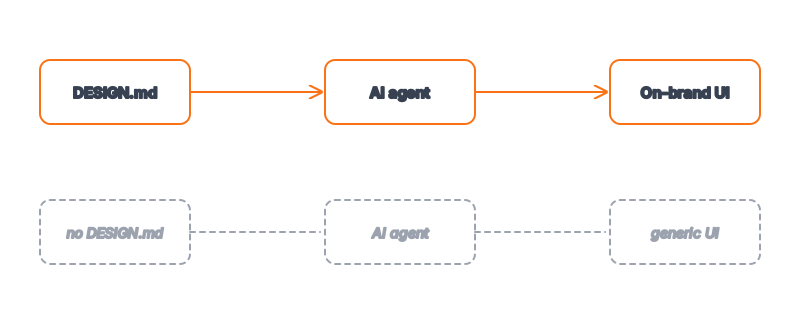
The Default Failure: Generic AI UI
Without a design system, an agent optimizes for the average of its training data. That average is Tailwind's default blue, system-ui at default sizes, arbitrary p-4 spacing, and rounded corners somewhere between 4px and 12px depending on the day. It looks like every other AI-generated app because it is the statistical center of every AI-generated app.
The problem isn't capability — the agent can produce beautiful, specific UI. The problem is it has no opinion about your product, so it defaults to no opinion at all. A design system is how you install that opinion. This is the same lesson as why AI output needs a DESIGN.md: the model is a generalist until you make it a specialist for your brand.
Step 1: Put a DESIGN.md in the Repo
Place DESIGN.md at the repo root (or in a docs/ folder the agent can reach). A minimal but complete file:
colors:
  primary: "#2563eb"
  primary-hover: "#1d4ed8"
  accent: "#f59e0b"
  background: "#ffffff"
  foreground: "#0f1111"
  muted: "#6b7280"
  border: "#e5e7eb"
typography:
  fontFamily: "Inter, system-ui, sans-serif"
  baseSize: "16px"
  weights: { regular: 400, medium: 500, bold: 700 }
rounded:
  button: "8px"
  card: "4px"
  input: "6px"
spacing: { xs: "4px", sm: "8px", md: "16px", lg: "24px", xl: "32px" }
Follow the tokens with a few lines of rationale — when to use accent, default spacing between blocks, which radius for which element. That prose is what makes the agent's choices match your intent, not just your values. If you're converting from a design tool, the Figma to DESIGN.md guide covers the export.
Step 2: Wire It Into CLAUDE.md
This is the step that turns a one-off into a default. Add a line to your project's CLAUDE.md so the agent treats the design system as a standing instruction, not something you have to remember to mention:
## UI & Styling

When building or editing any UI, always use the design tokens defined in
DESIGN.md (colors, typography, spacing, radii). Do not introduce colors,
font sizes, or spacing values that are not in DESIGN.md. If a needed
value is missing, add a named token to DESIGN.md and explain why, rather
than hardcoding a one-off value.
Now every session starts with the agent already knowing your design system exists and is mandatory. This is the leverage in CLAUDE.md as persistent context — you encode the rule once and it applies for the life of the project.
Step 3: The Prompt That Works
Even with CLAUDE.md wired up, name the file in the prompt for the strongest signal. Vague prompts ("make it look nice") invite the agent back to its generic defaults; specific token references hold it to your system.
# Strong prompt — references the file and the specific tokens
"Build a settings page using the tokens in DESIGN.md. Primary actions
use colors.primary with rounded.button radius; cards use rounded.card and
border. Body text is baseSize in foreground; secondary text uses muted.
Spacing between sections is spacing.lg. Do not introduce any values
outside DESIGN.md."
Compare that to "build a settings page." The difference in output is night and day — the first is your product, the second is a template. The pattern generalizes: state the file, state the role-to-token mapping for the key elements, and forbid off-system values. For the theory of why this works, see how agents build on-brand UIs.
Step 4: Verify, Then Tighten
Trust but verify. After the first build, check three things and tighten the rationale where the agent drifted:
| Symptom | Likely cause | Fix |
|---|---|---|
| Stray color appears | Rationale doesn't forbid off-palette values | Add "do not introduce colors outside the palette" |
| Inconsistent spacing | spacing scale missing a needed step | Add the step; restate "use only spacing tokens" |
| Wrong radius on a card | rounded roles ambiguous | Name roles explicitly: card vs button vs input |
| Font size not in scale | Typography scale incomplete | Add the step or point to typography systems |
Two iterations is normal on the first component. After that, the file is calibrated and subsequent builds land on-brand without correction. That payoff curve is the whole point: the cost is front-loaded, the benefit compounds across every future UI.
Frequently Asked Questions
Do I put DESIGN.md in CLAUDE.md or keep them separate?
Keep them separate. CLAUDE.md holds the instruction ("always use DESIGN.md"); DESIGN.md holds the system (tokens + rationale). Separating them keeps CLAUDE.md lean and lets designers own the design file without touching agent config. The one line in CLAUDE.md is the wiring; the design file is the payload.
Will the agent actually read DESIGN.md without me pasting it?
If it's in the repo and referenced in CLAUDE.md, yes — Claude Code reads project files as needed. But naming it explicitly in the prompt ("using the tokens in DESIGN.md") is the strongest signal and costs you nothing. Treat the prompt reference as belt-and-suspenders on top of the CLAUDE.md wiring.
What if I don't have a design system yet?
Two options. Build a minimal one — the accessible color palette and typography systems tutorials get you a complete file in under an hour. Or grab a ready-made one from the Designs category; each design system page gives you tokens you can drop straight into a repo.
Can I use this with a Shadcn or Tailwind project?
Yes, and it's a great fit. Map your DESIGN.md tokens onto Tailwind's theme config or Shadcn's CSS variables, then tell the agent to use the semantic tokens (primary, muted) rather than raw utility classes (bg-blue-600). The design file becomes the single source of truth that both your config and your agent read from.
How is this different from just prompting "use blue #2563eb"?
A one-off prompt fixes one element; it doesn't carry to the next component or the next session. A DESIGN.md wired into CLAUDE.md makes the constraint persistent and complete — every color, size, and spacing value, with the rationale for when to use each. You're installing a system, not patching a single output.
Browse 135+ agent-ready design systems in the Designs category, or explore the full skill catalog at aiskill.market.