Tutorials & How-Tos
Typography Systems for AI UIs
Encode a type scale, font family, weights, line-height and letter-spacing as DESIGN.md tokens so your AI agent ships consistent, readable text every time.
Encode a type scale, font family, weights, line-height and letter-spacing as DESIGN.md tokens so your AI agent ships consistent, readable text every time.
Open a UI an AI agent built without guidance and count the font sizes. You'll find seven, maybe eleven — text-sm here, 15px there, a heading at text-2xl next to one at text-3xl for no reason. Each one was a locally reasonable choice. Together they read as noise. Typography is the fastest way to tell whether a UI was designed or assembled, and it's the first thing agents get wrong when they're improvising element by element.
The cure is a type scale: a small, fixed set of sizes, plus the family, weights, line-heights, and spacing that go with them — all encoded as tokens in a DESIGN.md. When the only sizes that exist are the six in the scale, the agent can't invent a twelfth. This tutorial builds that system. For the broader token model, see the design tokens explainer.
xl is for headings with tight leading, not body copy.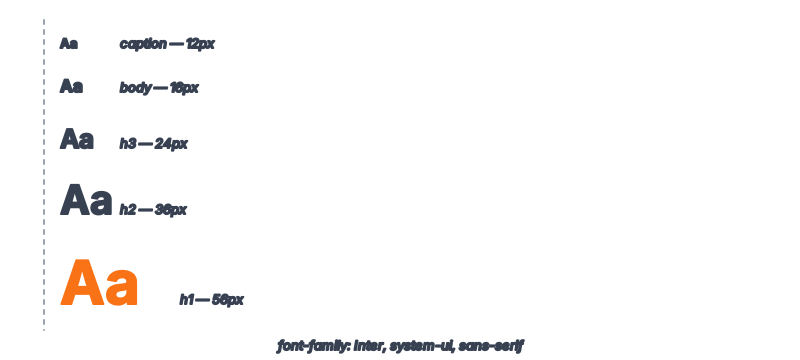
An agent generates UI one element at a time. Asked for a card, it picks a size for the title; asked for a list below it, it picks another; the footer gets a third. Nothing connects those choices because nothing told the agent they were related. Each decision is fine in isolation and the aggregate is chaos.
A type scale fixes this by making size a selection problem, not a generation problem. Instead of "what size should this heading be?" the agent answers "which scale step does this heading map to?" — a much narrower question with a finite answer set. This is the same constraint logic that makes agent-built UIs go on-brand: remove the open-ended choice and consistency falls out for free.
A type scale is a sequence of sizes generated from a base and a ratio. Pick a base (14px or 16px for UI), a ratio (1.2 "minor third" is calm; 1.25 or 1.333 is more dramatic), and round to whole pixels. A clean UI scale:
| Step | Size | Role |
|---|---|---|
xs | 12px | Captions, labels, metadata |
sm | 14px | Secondary body, helper text |
base | 16px | Primary body text |
lg | 20px | Lead paragraphs, card titles |
xl | 24px | Section headings |
2xl | 32px | Page titles |
3xl | 40px | Hero headlines |
Seven steps is plenty for most products. The discipline isn't the math — it's the closed set. Resist a 19px "just for this one banner." The MDN guidance on fundamental text styling is a good refresher on how size, weight, and leading interact.
Size alone is a third of a typography system. The agent also needs to know which family to use, which weights are available, and how to space lines and letters. Skip these and the agent picks defaults that vary per component.
regular: 400, medium: 500, bold: 700. Don't list weights the font lacks — the browser will fake them and they'll look wrong.-0.02em on headings), leave body at 0. Wide tracking (0.05em) suits uppercase labels.Assemble the typography block. Pairing each size with its line-height is the key move — it stops the agent from applying body leading to a headline.
typography:
  fontFamily: "Inter, system-ui, -apple-system, sans-serif"
  fontFamilyMono: "JetBrains Mono, ui-monospace, monospace"
  baseSize: "16px"
  weights:
    regular: 400
    medium: 500
    bold: 700
  scale:
    xs:   { size: "12px", lineHeight: "1.4",  weight: 500 }
    sm:   { size: "14px", lineHeight: "1.5",  weight: 400 }
    base: { size: "16px", lineHeight: "1.6",  weight: 400 }
    lg:   { size: "20px", lineHeight: "1.4",  weight: 500 }
    xl:   { size: "24px", lineHeight: "1.25", weight: 700 }
    "2xl":{ size: "32px", lineHeight: "1.15", weight: 700 }
    "3xl":{ size: "40px", lineHeight: "1.1",  weight: 800 }
  letterSpacing:
    heading: "-0.02em"
    body: "0"
    label: "0.05em"
Note the line-heights tighten as sizes grow — 1.6 for body, 1.1 for the hero. That inverse relationship is what makes large headings feel set rather than stretched, and it's the detail agents almost never get right unsupervised.
Tokens define what's available; the rationale tells the agent which step maps to which job. Without it, the agent might use xl for body text on a "spacious" page.
## Typography Rationale

- Body copy is `base`. Long-form reading may use `lg` for the lead
  paragraph only. Never set body below `sm`.
- Headings map directly: page title = `2xl`, section heading = `xl`,
  card/subsection title = `lg`. Hero headline = `3xl`, used once per page.
- Captions, timestamps, and form labels use `xs` with `label` spacing if
  uppercase.
- Use `bold` (700) for headings, `medium` (500) for emphasis and labels,
  `regular` (400) for body. Do not introduce weights outside the set.
- Do not invent sizes. Every text element must map to a scale step.
That final constraint is the one that holds the whole system together. It converts an open-ended sizing decision into a lookup — exactly the property that separates a real system from a loose style guide.
Test the scale on a page with lots of text hierarchy — a dashboard or article view, not a landing page with three words on it.
# In Claude Code
"Build an article layout using only the typography scale in DESIGN.md.
Title = 2xl, section headings = xl, body = base, captions = xs. Apply
the matching line-height for each step. Do not introduce any font size
not in the scale."
Open it and count the sizes. There should be exactly the steps you used — no strays. Check the headline's line-height looks tight and the body's looks comfortable to read. If the agent flattened everything to one leading value, your scale's per-step line-height wasn't read; restate it in the prompt. This round-trip check is the same one in the Figma to DESIGN.md workflow.
Six to eight scale steps cover nearly every product: caption, secondary, body, lead, two or three heading sizes, and a hero. More than that and the hierarchy stops reading as deliberate. The number matters less than the rule that nothing exists outside the scale.
1.2 (minor third) for calm, information-dense UIs; 1.25 or 1.333 for more editorial, high-contrast layouts. Generate sizes from base × ratio, then round to whole pixels for crispness. Don't over-think it — pick one ratio, apply it consistently, and the consistency does more work than the exact number.
Because optimal leading changes with size. Body text reads best around 1.5–1.6; a 40px headline at 1.6 looks like it's falling apart, and wants ~1.1. Agents default to one line-height for everything unless each scale step carries its own. Pairing them in the token block makes the right value automatic.
The agent only needs the font name in the token to write correct code. Actually loading the font (via @font-face, Google Fonts, or next/font) is a separate build concern. Always include system fallbacks in the fontFamily stack so the UI is readable even before the custom font loads.
Often, yes — but marketing pages tend to want a larger top end (a 4xl/5xl for hero impact) while app UIs lean on the smaller steps for density. You can extend one scale upward rather than maintaining two systems; just keep the shared steps identical so the brand reads consistently across both.
Browse 135+ agent-ready design systems in the Designs category, or explore the full skill catalog at aiskill.market.
### Spotify - Music streaming. - Vibrant green on dark, bold type, album-art-driven - Spotify's web interface is a dark, immersive music player that wraps li…
### Raycast - Productivity launcher. - Sleek dark chrome, vibrant gradient accents - 属于: A dark-canvas developer-tools system that treats the marketing page…
### MongoDB - Document database. - Green leaf branding, developer documentation focus - description: MongoDB carries a strong dual-mode visual identity — dar…
### NVIDIA - GPU computing. - Green-black energy, technical power aesthetic - An engineering-grade marketing system organized around two surface modes — a de…