How Agents Build On-Brand UIs
How AI agents turn a DESIGN.md file into on-brand components: the workflow that replaces generic AI output with UI that actually matches your product.
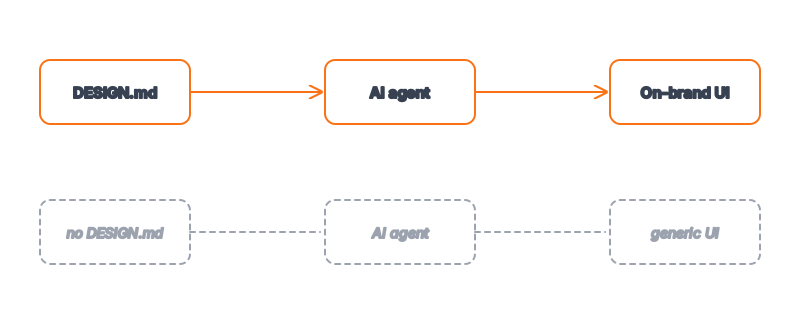
Ask two developers to generate a pricing page with the same AI agent and the same prompt, and you can usually tell which one fed the agent a design system. One screen has the tell-tale blue-violet gradient, arbitrary corner radii, and a default font stack — the visual signature of a model regressing to the mean of everything it has ever seen. The other looks like it shipped from a real product team: a deliberate palette, consistent spacing rhythm, type that matches the brand. The model's raw capability is identical in both cases. What changed is that one developer gave the agent a DESIGN.md file and the other left it guessing.
This piece is about the mechanics of that difference — the actual workflow an agent runs when it has a design system to read, and why a structured token spec produces on-brand components where a vague prompt produces generic ones.
Key Takeaways
- Agents do not invent a visual language — they fill gaps with the average. Give them no design context and they default to the generic AI aesthetic; give them a DESIGN.md and they apply your tokens instead.
- The workflow is read → map → apply → check. The agent parses the token block, maps semantic roles to your values, applies them to components, and self-checks against the spec.
- Design tokens are the contract. A named token like
color.primaryis something an agent can apply deterministically — see what design tokens are for agents. - Specificity beats verbosity. A tight token spec outperforms paragraphs of prose describing "a clean, modern look," because tokens remove the guesswork.
- On-brand output compounds. Once an agent has the spec, every new screen inherits the same system — explore 135+ agent-ready design systems to feed yours.
Why Generic Output Happens In The First Place
An AI agent generating UI is doing constrained prediction. You ask for a settings page; the model produces the most probable settings page given its training distribution. That distribution is the entire public web, which means the "most probable" button is a medium-blue rounded rectangle, the most probable heading is a bold sans-serif, and the most probable accent is whatever gradient appeared in ten thousand landing-page screenshots. None of these choices are wrong. They are simply average — and average is exactly what makes AI output look like AI output.
The fix is not a better model or a longer prompt. It is removing the ambiguity that forces the model to guess. When you tell an agent "make it look clean and modern," you have given it no constraint at all; "clean and modern" describes most of its training data. When you give it color.primary: "#FF6B35" and radius.md: "12px", there is nothing left to average. The agent stops predicting a plausible design and starts applying a specified one.
The Four-Step Workflow An Agent Runs
When an agent has a DESIGN.md in context, building a component follows a predictable loop.
Read. The agent parses the token block — colors, typography, spacing scale, radii, shadows — into a structured map it can reference. The markdown rationale beneath the tokens tells it when to reach for each value (e.g. "orange gradient reserved for primary CTAs and emphasis, never body text").
Map. The agent translates the component's semantic needs to your tokens. A primary button needs a background, a label color, a corner radius, and a hover state; the agent resolves each of those to a named token rather than inventing a hex code on the spot.
Apply. It emits the actual code — Tailwind classes, CSS variables, styled components — wired to your values. This is where a good spec pays off: because the tokens are named and consistent, the agent reuses spacing.4 everywhere a medium gap is needed instead of scattering gap-3, gap-5, and gap-6 at random.
Check. The strongest agents close the loop by re-reading the spec and verifying the output honors it: are CTAs using the reserved gradient, is type sticking to the defined scale, is contrast within the documented accessibility floor? This self-check is what turns "mostly on-brand" into "on-brand."
Prompt Versus Token Spec: A Side-by-Side
The difference is easiest to see when you compare what the agent has to work with.
| Aspect | Vague prompt ("clean and modern") | DESIGN.md token spec |
|---|---|---|
| Primary color | Agent guesses — usually a generic blue | color.primary resolved to your exact hex |
| Spacing | Inconsistent, picked per-component | Single named scale reused everywhere |
| Typography | Framework default font stack | Defined family, weights, and type scale |
| Corner radii | Arbitrary per element | One radius scale applied consistently |
| Reproducibility | Different every run | Stable across runs and screens |
| Reviewability | Nothing to diff | Spec is a file you can review in a PR |
The prompt column is not broken — it produces working UI. It just produces anyone's UI. The token column produces yours, every time.
What Does The Agent Actually Need In The File?
Less than people expect. A useful DESIGN.md for agent consumption needs four things: a color system with semantic names (not just a swatch list, but primary, surface, muted, success), a typography definition (family, weights, and a type scale), a spacing and radius scale, and a short rationale block that encodes the rules a designer would enforce in review. That rationale is the part most people skip and the part that matters most — it tells the agent that the gradient is for CTAs only, that headings use the tight letter-spacing, that cards get a 2px border that turns orange on hover. Those are the judgment calls that separate a brand from a palette.
You do not have to write this from scratch. The whole premise of an indexed design-system registry is that the hard part — distilling a product's visual language into agent-readable tokens — is already done. You can study how a fintech system signals trust through restraint or how dev-tool systems lean dark and dense, then hand the relevant spec to your agent. Real examples like the Stripe design system show what a production-grade token set looks like before you adapt it to your own brand.
How To Get The Best On-Brand Results
A few practices reliably improve agent output. Keep the token names semantic, not literal — color.danger survives a rebrand that color.red does not. Put the rules in the rationale, because an agent honors written constraints far better than implied ones. Reference the DESIGN.md explicitly in your prompt rather than hoping the agent noticed it ("Build the pricing card using the tokens and rules in DESIGN.md"). And review the first generated component against the spec yourself; once it is right, every subsequent screen inherits the same system for free. This is the compounding payoff — the file is written once and pays out across the entire interface.
Frequently Asked Questions
Do I need a special agent to use a DESIGN.md file?
No. Any capable coding agent — Claude Code among them — can read a markdown file in its context and apply the tokens inside it. The file is just structured text; the leverage comes from giving the agent something specific to apply instead of leaving it to average its training data.
Will the agent follow the rationale, or just the color values?
It follows both, and the rationale is what lifts output from "uses the right colors" to "uses them the right way." Written rules like "gradient reserved for primary CTAs" are constraints the agent honors during generation and can verify during its self-check.
How is this different from a traditional style guide?
A style guide is written for humans to read and interpret. A DESIGN.md is written so an agent can parse and apply it directly, with the human-readable rationale layered on top. See DESIGN.md vs. style guide for the full contrast.
Can one DESIGN.md keep an entire app consistent?
Yes — that is the point. Because every screen resolves the same named tokens, the agent reuses the same spacing, radii, and colors across the whole interface instead of re-guessing per component. Consistency stops being something you police manually.
Where do I find ready-made design systems to start from?
The Designs category on aiskill.market indexes 135+ agent-ready systems across fintech, dev tools, media, e-commerce, and more, each with a detail page you can pull tokens from.
Browse 135+ agent-ready design systems in the Designs category, or explore the full skill catalog at aiskill.market.