A Tour of 135 Design Systems
A guided tour of the 135+ agent-ready design systems in the aiskill.market Designs category: the sub-categories, the standouts, and how to actually use them.
A blank DESIGN.md is intimidating in the same way a blank page is. You know your product needs a coherent visual language, you know an AI agent could build it for you if you handed it tokens, but deriving those tokens from scratch — palette, type scale, spacing, radii, and the rationale tying them together — is real work. The aiskill.market Designs category exists to delete that blank-page problem. It indexes 135+ design systems as agent-readable specs, sorted by industry, so you can start from a vetted, real-world token set instead of nothing.
This piece interprets publicly indexed DESIGN.md specs and brand aesthetics; it is not affiliated with or endorsed by the companies named.
This is the guided tour: what is in there, how it is organised, the standouts worth opening first, and how to turn a browse into a shipped interface.
Key Takeaways
- 135+ design systems, sorted by industry. The category is organised into sub-categories so you can jump straight to systems built for your kind of product.
- Each entry is an agent-readable spec, not a screenshot — a DESIGN.md-style token set your agent can apply directly.
- The standouts teach principles, not just palettes — Stripe's restraint, Raycast's density, Spotify's contrast — covered in 9 systems to steal.
- Pick by audience, not by taste. Fintech, dev tools, media, and e-commerce systems pull in different directions on purpose.
- The whole point is to skip the blank page. Start from a real spec in the Designs category and adapt, rather than deriving tokens from zero.
How The Category Is Organised
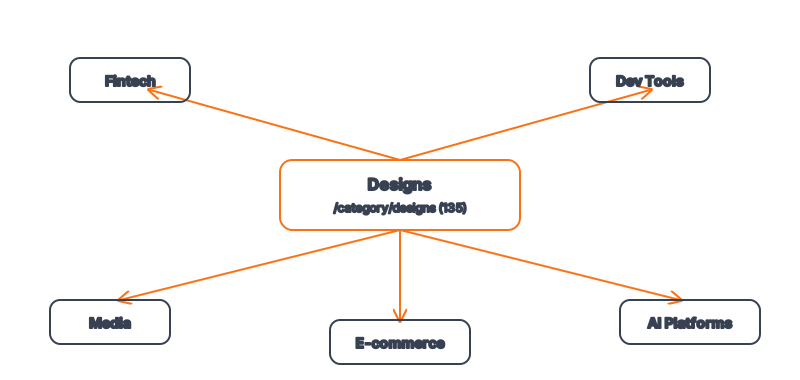
The 135+ systems are grouped into sub-categories so the catalog stays navigable instead of becoming an undifferentiated pile. The groupings reflect how products actually cluster: Design Systems (the foundational, general-purpose sets), Fintech & Crypto, Developer Tools & IDEs, Media & Consumer Tech, E-commerce & Retail, AI & LLM Platforms, Backend / Database / DevOps, Automotive, Productivity & SaaS, and Design & Creative Tools. The benefit of this structure is that you rarely need to browse all 135 — you go to the sub-category matching your product and compare the handful of systems built for the same audience and the same constraints. A developer-tool builder lands in one group; a fintech founder lands in another; neither wastes time on systems designed for a different user.
The Standouts Worth Opening First
A few systems are worth studying before anything else, because each one cleanly demonstrates a single design principle you can lift.
| System | Sub-category | What it demonstrates |
|---|---|---|
| Stripe | Fintech & Crypto | Restraint as a trust signal |
| Discord | Media & Consumer Tech | Personality without unprofessionalism |
| Spotify | Media & Consumer Tech | Dark-first single-accent contrast |
| Raycast | Developer Tools & IDEs | Density and keyboard-first speed |
| MongoDB | Backend / Database / DevOps | Technical clarity at scale |
| Humane | Media & Consumer Tech | Ambient, low-chrome interfaces |
Open these first not because they are the only good ones, but because they span the range — restraint to personality, density to ambience — and once you internalise those poles, every other system in the catalog locates itself somewhere between them. Beyond the standouts, the registry also indexes systems from Amazon, Instagram, LinkedIn, Cloudflare, BYJU'S, Bento, and many more across the sub-categories.
How Do You Choose The Right One?
Choose by audience and product type, not by which palette you personally like. The single most common mistake is a developer-tool builder picking a beautiful consumer system and ending up with a padded, light-mode interface that fights their power users — or a fintech founder borrowing a playful media aesthetic that quietly erodes trust at the payment step. Start from the sub-category that matches what you are building. If you are building for engineers, the dev-tool aesthetic — dark, dense, keyboard-first — is your starting point. If you are handling money, the fintech trust playbook — restraint, precision, calm — is yours. Let the audience pick the system; refine for personality after.
What An Entry Actually Gives You
Each detail page is more than a mood board. It is a spec your agent can read: a structured token set (colors with semantic names, a type scale, spacing and radii) plus the rationale that explains how the system uses those tokens — which color is reserved for primary actions, how tight the spacing runs, what the brand's typographic voice is. That rationale is the difference between an agent that uses the right hex codes and one that uses them the right way. Because the distillation work is done, you get the value a design team would normally charge for: a coherent, reviewable visual language in a form your tooling can consume immediately.
From Browse To Shipped Interface
The workflow is short on purpose. Find the system that fits your audience in the relevant sub-category. Open its detail page and read both the tokens and the rationale. Copy the spec into a DESIGN.md in your project, adjusting the accent color and a few specifics so it is yours rather than a clone. Then reference that file explicitly when you prompt your agent — "build the dashboard using the tokens and rules in DESIGN.md" — and let it generate on-brand components. What used to be a multi-week design effort collapses into an afternoon of selection and refinement. For background on the agent-UI pattern this builds on, Google's design and UX research is a useful external reference, and the open-source Awesome DESIGN.md project shows the community version of the same idea.
Frequently Asked Questions
Are these official design systems from the companies?
No. They are interpretations of publicly observable brand aesthetics and public DESIGN.md specs, distilled into agent-readable token sets. They are not affiliated with or endorsed by the companies named — treat them as a learning and starting resource, and build your own brand on top.
Do I have to use all 135?
You use one. The catalog is large so that whatever you are building, a relevant system exists; you pick the single best fit for your audience and adapt it. Browsing all 135 would defeat the purpose of the sub-category structure.
Can I mix two systems?
Carefully, yes — for example, a dev-tool density model with a fintech-grade trust palette. But mixing dilutes coherence, so do it deliberately and keep one system as the backbone rather than blending several equally.
How current are the systems in the category?
The Designs category is maintained as an indexed registry on aiskill.market, with 135+ systems across the sub-categories above. Browse the live Designs category for the current set and any recent additions.
What do I do after I pick one?
Copy its tokens into your project's DESIGN.md, adjust the specifics to your brand, and reference the file when prompting your agent. See how agents build on-brand UIs for the generation workflow.
Browse 135+ agent-ready design systems in the Designs category, or explore the full skill catalog at aiskill.market.