What Is a DESIGN.md File?
A DESIGN.md file is an agent-readable design spec: YAML design tokens plus markdown rationale that teaches AI agents to build on-brand UIs, not generic output.
Ask an AI coding agent to build you a settings page and you get a settings page. It works. The buttons click, the inputs validate, the layout holds together on mobile. But it looks like every other AI-generated screen on the internet: a blue-violet gradient somewhere, rounded corners that feel arbitrary, a font stack that defaults to whatever the framework ships with. The problem isn't the model's capability. The problem is that you never told it what your product looks like, so it guessed — and the guess regresses to the mean of everything it has ever seen.
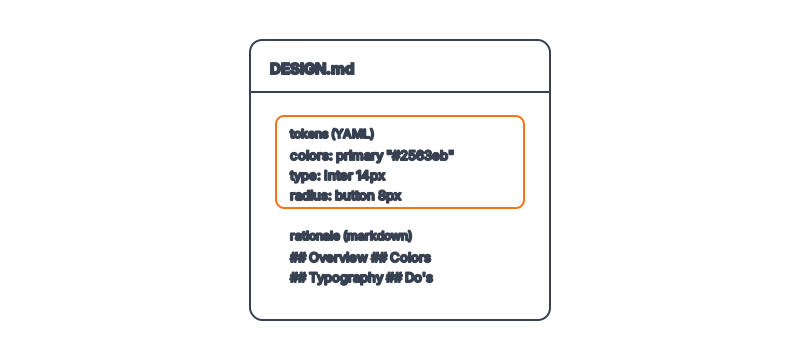
A DESIGN.md file is the answer to that problem. It is a single, agent-readable document that captures a product's design system as a block of structured design tokens (colors, typography, spacing, radii) followed by markdown rationale explaining the intent behind each choice. Machine-parseable enough for an agent to apply directly, human-readable enough that a designer can review it in a pull request. Feed one to Claude Code and the generic settings page becomes your settings page.
Key Takeaways
- A DESIGN.md is an agent-readable design spec — a YAML token block plus markdown rationale, in one file an agent can parse and a human can review. See what design tokens actually are.
- It exists to give agents design context. Without it, AI output regresses to a generic mean; with it, agents build on-brand UIs that match your product.
- The structure is consistent: token frontmatter (colors, typography, radii, spacing) then markdown sections — Overview, Colors, Typography, Components, Layout, Do's and Don'ts.
- It is both human and machine-readable — the key difference from a traditional style guide, which only humans can consume.
- It is often called "Stitch-style," after Google's documented pattern for agent-driven UI work.
Why does a DESIGN.md file exist?
The format exists because agents need design context in a form they can use, and no existing artifact provided it. Style guides live in PDFs and Figma libraries. Design decisions live in designers' heads. Brand colors live in a CSS file three directories deep that the agent may or may not read. None of these are a single, declarative source of truth an agent can load before it writes a line of UI code.
A DESIGN.md collapses all of that into one file at the root of your repo. When you prompt an agent to build a component, you point it at the DESIGN.md, and the agent now knows your primary color is #635BFF rather than a default blue, that your buttons use an 8px radius rather than fully rounded pills, and that your type scale starts at 14px rather than 16px. The decisions stop being implicit. They become parameters the agent reads and applies.
What's inside a DESIGN.md file?
A DESIGN.md has two halves. The first is a token block — typically YAML frontmatter or a fenced code block — that holds the machine-readable values. The second is markdown prose that explains the reasoning. Here is a representative token block:
colors:
  primary: "#635BFF"
  background: "#0A2540"
  surface: "#FFFFFF"
  text: "#3C4257"
typography:
  fontFamily: "Inter, system-ui, sans-serif"
  baseSize: "14px"
  weights: [400, 500, 600]
  lineHeight: 1.5
  letterSpacing: "-0.01em"
rounded:
  button: "8px"
  card: "12px"
  input: "6px"
spacing:
  unit: "4px"
  scale: [4, 8, 12, 16, 24, 32, 48]
Below the tokens come the markdown sections. Overview sets the character of the brand in a sentence or two — the Stripe DESIGN.md, for instance, captures a feel that is "simultaneously technical and luxurious." Colors explains when to use each value. Typography covers the scale and its emotional weight. Components documents button, card, and input rules. Layout & Spacing establishes the grid. Do's and Don'ts prevents the common mistakes — the off-brand gradient, the wrong shadow, the radius that doesn't match.
How does an agent actually use it?
The token block is the part an agent consumes directly. Because the values are named and structured, the agent doesn't interpret "use a calm blue" — it reads primary: "#635BFF" and applies that exact hex. This is the same decoupling that the design tokens standard from the W3C Design Tokens Community Group formalizes: design decisions become named, portable values rather than hardcoded magic numbers.
The markdown half does something the tokens can't: it carries intent. Tokens tell the agent what the primary color is; the prose tells it why and when. An agent reading "reserve the laser-red accent for a single primary action per screen" will restrain itself in a way that a raw color value never communicates. The combination is what makes the format work — values for precision, prose for judgment.
| Aspect | Token block (YAML) | Markdown rationale |
|---|---|---|
| Audience | Agent (and tooling) | Agent and human |
| Carries | Exact values | Intent and constraints |
| Example | primary: "#635BFF" | "Use primary only for the main CTA" |
| Changes how output looks | Yes — directly | Yes — via judgment |
| Reviewable in a PR | Yes | Yes |
Where does the "Stitch-style" name come from?
You'll often hear DESIGN.md files described as "Stitch-style." That refers to Google Stitch, Google's documented pattern for agent-driven UI generation, where a structured design specification feeds the model so its output stays on-brand. The DESIGN.md format generalizes the same idea into a plain file you can keep in any repository, independent of any one tool. We unpack that lineage in Stitch-style design systems explained.
The broader point is that a standard, predictable location and structure matters as much as the content. When every product keeps its design system in a DESIGN.md at the repo root, any agent — Claude Code, Cursor, or the next one — knows where to look and how to read it.
Frequently Asked Questions
Is a DESIGN.md the same as a style guide?
No. A style guide is a human-facing document — a PDF or a Figma file meant for people to read. A DESIGN.md is both human and agent-readable, with a token block an agent can apply directly. We compare them in detail in DESIGN.md vs a style guide.
What format are the tokens in?
Usually YAML, either as frontmatter or a fenced code block, though JSON works too. The point is that the values are structured and named — primary: "#635BFF" — so an agent reads them deterministically instead of inferring them from prose.
Do I need a designer to write one?
No, though it helps. You can extract a serviceable DESIGN.md from an existing codebase or brand, then refine it. The Designs category on aiskill.market indexes 135 ready-made design systems you can adapt as a starting point.
Does a DESIGN.md replace my CSS or design tokens?
No — it complements them. Your CSS still ships to the browser. The DESIGN.md is the upstream source of truth an agent reads to generate code that produces the right CSS in the first place.
Which AI tools can read a DESIGN.md?
Any agent you can point at a file. Claude Code, Cursor, and similar tools read the file as context. Because it's plain markdown with structured tokens, there's no proprietary parser required — see how agents build on-brand UIs.
Browse 135+ agent-ready design systems in the Designs category, or explore the full skill catalog at aiskill.market.