Design Systems for Solo Builders
How a solo builder plus an AI agent ship on-brand UIs fast using a DESIGN.md from the registry. The leverage that closes the design gap without a designer.
For most of software history, the solo builder lost on design. You could out-ship a team on features, but your app looked solo — the inconsistent spacing, the off-brand blue, the eleven font sizes that quietly signaled "one person, no designer." Design was a team sport, and you weren't a team. That gap has closed, and most builders haven't noticed yet.
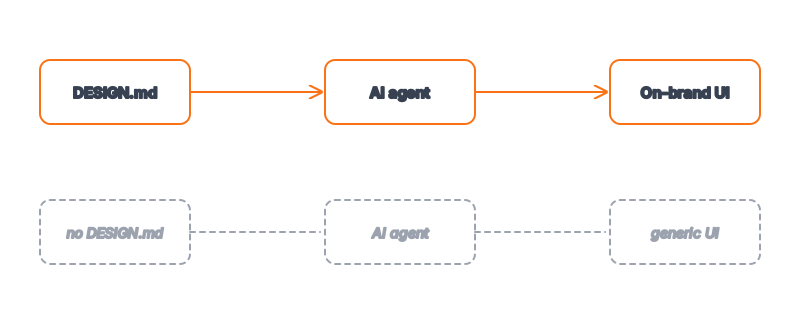
The thing that closed it is the combination of a coding agent and a portable design system. A DESIGN.md — a token block plus rationale the agent reads — lets one person ship UI with the consistency that used to require a design team and a Figma library. You don't draw it; you grab one, wire it in, and let the agent apply it across every screen. This is the leverage move for solo builders in 2026, and this post is about how to actually use it.
Key Takeaways
- Design used to be a team advantage. Now it's a file. A
DESIGN.mdgives a solo builder the consistency that previously required a designer and a component library. - Don't design — select. Grab a vetted system from the Designs category and spend your time shipping, not picking hex codes.
- Consistency is the signal, not flair. Users read a coherent system as "professional"; a
DESIGN.mdmakes coherence automatic. - Wire it once, benefit forever. The setup is one file plus one line in
CLAUDE.md— see give your agent a design system. - The bottleneck moved. With design handled, what you choose to build matters more than how it looks — pick the system, then go fast.
The Solo Builder's Old Design Problem
The solo design gap was never about taste — plenty of solo builders have great taste. It was about bandwidth. A real design system means defining a palette, checking contrast, building a type scale, standardizing spacing, documenting when to use what, and then enforcing it across dozens of components. That's days of work that produces zero features, so solo builders skipped it. The app shipped, and it looked like the corner was cut, because it was.
AI didn't fix this by making solo builders better designers. It fixed it by making the design system portable and enforceable by an agent. The work that used to take days — define, document, enforce — collapses into "grab a file, reference it, build." The why AI output needs a DESIGN.md argument applies double for solo builders: you have the least time to correct generic output, so getting it right up front matters most.
Select, Don't Design
The instinct, when you finally have time for design, is to build a system from scratch. Resist it. Your comparative advantage as a solo builder is shipping product, not picking between two shades of slate for an afternoon. The faster path is selection.
The Designs category indexes 135 design systems — extracted from real products, structured as agent-readable tokens. Each detail page gives you a complete DESIGN.md you can drop into a repo. Want a clean, technical look? Grab a dev-tool system. Building something that needs to feel trustworthy? Start from a fintech-leaning palette. You're not copying a brand — you're starting from a coherent, contrast-checked foundation and adjusting the primary color to be yours.
| Approach | Time to first on-brand UI | Where your hours go |
|---|---|---|
| Design from scratch | 1–3 days | Palette, type scale, docs, enforcement |
| Hire a designer | Days to weeks | Briefing, review cycles, budget |
| Grab a DESIGN.md from the registry | ~30 minutes | Shipping features |
The third row is the unlock. Thirty minutes to a foundation that an agent then applies consistently for the life of the project.
The Solo Workflow, End to End
Here's the whole loop, start to finish, for one builder and one agent:
- Select a system. Browse the Designs category, open a detail page, copy its
DESIGN.md. - Drop it in the repo at the root. Adjust
primaryto your brand color; leave the structure alone. - Wire it into CLAUDE.md with one instruction so the agent always applies it:
## UI & Styling
Always build UI using the tokens in DESIGN.md. Never introduce colors,
font sizes, or spacing outside it. If a value is missing, add a named
token and note why.
- Build with token-aware prompts. Reference the file in each UI request:
"Build the dashboard layout using the tokens in DESIGN.md. Cards use
rounded.card and border; the primary CTA uses colors.primary; body text
is foreground, secondary text is muted; section spacing is spacing.lg."
- Ship. The output is consistent across screens because every screen reads the same file.
That's it. No design review meetings, no component-by-component correction. The give your agent a design system workflow has the detailed version, but for a solo builder this five-step loop is the whole story.
Why Consistency Beats Flair
Solo builders often think they need distinctive design to compete. They don't — they need consistent design. Users rarely consciously admire a clever gradient, but they unconsciously distrust an app where the buttons don't match and the spacing wanders. Consistency reads as "this is a real product, built by people who care." Inconsistency reads as "side project, proceed with caution."
A DESIGN.md delivers consistency by construction. Every button uses the same primary, every card the same radius, every heading a scale step — because every component reads from one source. You get the appearance of a design team's discipline without the team. And once design stops being a bottleneck, the real question surfaces: not "does this look good?" but "is this the right thing to build?" — which is where a solo builder's judgment actually earns its keep.
Frequently Asked Questions
I'm not a designer. Can I really ship good-looking UI solo?
Yes — because you don't have to design, you have to select and apply. Starting from a vetted DESIGN.md means the hard taste decisions (palette harmony, contrast, type scale) are already made by whoever extracted that system. Your job is to pick one that fits your product and let the agent apply it consistently. That's a selection skill, not a drawing skill.
How long does it take to set up?
About thirty minutes for the first project: pick a system, copy its DESIGN.md, swap in your brand color, add one line to CLAUDE.md. After that, every UI build reuses the same file with no additional setup. The cost is one-time and small; the consistency benefit compounds across every screen you ever ship.
Should I customize the system or use it as-is?
Customize lightly. Swap primary for your brand color and maybe adjust the radius to match your product's feel (tighter for technical, softer for consumer). Resist rebuilding the whole thing — the value of starting from a vetted system is that its proportions and contrast already work. Heavy customization re-introduces the work you were trying to skip.
What if my product is genuinely unusual and no system fits?
Start from the closest match and extend it. Even an unusual product needs a palette, a type scale, and spacing — and 80% of those are universal. Take a system whose feel is right, keep its structure, and add the tokens your unique cases need. Building entirely from scratch is almost never worth it for a solo builder; see from Figma to DESIGN.md if you do have an existing design to convert.
Does this lock me into one look forever?
No. Because the system is semantic tokens, rebranding later is changing a handful of hex values, not refactoring components. Swap primary, adjust accent, re-verify contrast, and every screen updates at once. The DESIGN.md makes your design more portable, not less — the opposite of being locked in.
Browse 135+ agent-ready design systems in the Designs category, or explore the full skill catalog at aiskill.market.