Tutorials & How-Tos
Build an Accessible Color Palette
Define semantic color tokens and pass WCAG contrast for an agent-ready palette. A step-by-step guide to building an accessible DESIGN.md color system.
Define semantic color tokens and pass WCAG contrast for an agent-ready palette. A step-by-step guide to building an accessible DESIGN.md color system.
Ask an AI agent for a color palette and you'll usually get something that looks great in the mockup and fails in production. Light gray text on white. A brand color used for both buttons and body copy. A "subtle" placeholder that's invisible to anyone over 40. The agent isn't careless — it's optimizing for what looks good in a screenshot, not what's readable for every user on every screen.
The way to fix this is not to review every color after the fact. It's to give the agent a palette where the accessible choice is the only choice. That means semantic tokens with contrast baked in, written into a DESIGN.md the agent reads before it writes a line of UI. This tutorial builds that palette step by step. If you're new to the token format, the design tokens explainer covers the basics first.
foreground, muted, and border tell an agent where a color goes; gray-400 tells it nothing useful.muted is for secondary text on background only — never on a colored surface.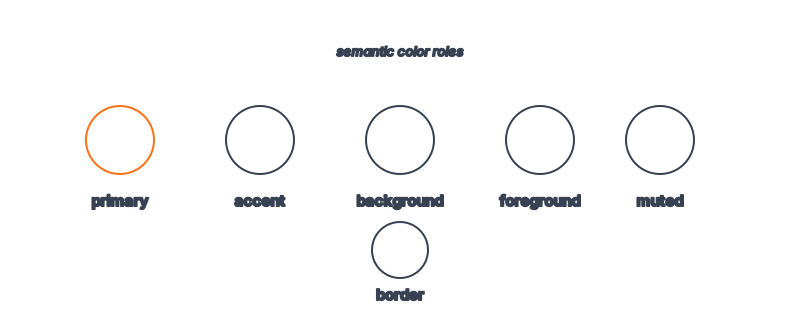
Models are trained on the web, and the web is full of beautiful, inaccessible design. Thin gray text on white scores well visually in training data, so the model reaches for it. It also has no inherent sense of contrast ratio — it can compute one if asked, but it won't self-impose the constraint unless your tokens make it unavoidable.
The structural fix is to remove the decision. If your palette only contains pairs that pass contrast, the agent physically can't choose a failing combination. This is the same principle behind giving agents a design system at all: constrain the inputs, and good output follows. Raw hex with no guidance leaves the door open; semantic tokens close it.
Start with roles, not shades. A small, complete semantic palette looks like this:
| Token | Role | Pairs with |
|---|---|---|
background | Page / card surface | foreground, muted |
foreground | Primary text, icons | background |
muted | Secondary text, captions | background |
primary | Primary action, links | primary-foreground |
primary-foreground | Text on primary surface | primary |
border | Dividers, input outlines | (non-text) |
accent | Highlights, badges | accent-foreground |
destructive | Errors, delete actions | background |
The pairing column is the accessibility contract. Each text token has a declared surface, and you'll verify each pair in Step 3. The agent reads this and knows muted is only safe on background.
Pick hex values for each role. Lead with your brand color for primary, then build neutrals around it. Here's a worked example:
colors:
  background: "#ffffff"
  foreground: "#0f1111"      # near-black, 19:1 on white
  muted: "#4b5563"           # gray-600, 7.5:1 on white
  primary: "#2563eb"         # brand blue
  primary-foreground: "#ffffff"
  primary-hover: "#1d4ed8"
  border: "#e5e7eb"          # non-text, no contrast requirement
  accent: "#b45309"          # amber-700, 4.8:1 on white
  accent-foreground: "#ffffff"
  destructive: "#b91c1c"     # red-700, 5.9:1 on white
Notice muted is gray-600, not the more common gray-400. Gray-400 (#9ca3af) on white is only ~2.5:1 — it fails. Gray-600 clears 4.5:1 with room to spare. This single substitution prevents the most common AI palette failure.
Don't eyeball it. Run each text-on-surface pair through a contrast formula. The thresholds from the WCAG contrast guidance are:
A quick way to check the whole palette at once is to ask your agent to compute it:
# In Claude Code
"For each text/surface pair declared in DESIGN.md, compute the WCAG
contrast ratio. Flag any below 4.5:1 for body or 3:1 for large text.
Output a table: pair, ratio, pass/fail."
Fix anything that fails by darkening the text token or lightening the surface — never by making the text smaller to qualify for the 3:1 large-text threshold. That's gaming the rule, not meeting it. Re-run until every pair passes.
Tokens prevent bad combinations only if the agent knows the rules. Add a rationale block that pins down usage:
## Color Rationale

- `foreground` on `background` for all body text. Never use `muted` for
  primary content — it is for captions, timestamps, and helper text only.
- `muted` is verified only against `background`. Never place `muted` text
  on `primary`, `accent`, or any colored surface.
- Buttons: `primary-foreground` on `primary`. Hover swaps to
  `primary-hover`, which keeps the same foreground contrast.
- `border` is non-text and may sit at 3:1; never use it for text.
- Do not introduce colors outside this palette. If a design needs a new
  role, add a named token here and verify its contrast first.
That last line matters most: it forbids the agent from inventing a stray hex mid-build, which is how palettes drift back into inaccessibility. This is the discipline that separates a real system from a decorative style guide.
Hand the agent the palette and a component that's contrast-heavy — a form is ideal, since it has labels, helper text, placeholders, and error states.
"Build a sign-up form using only DESIGN.md tokens. Labels use foreground,
helper text uses muted, the submit button uses primary, and the error
message uses destructive. Do not add any colors not in the palette."
Inspect the output with a contrast checker or your browser's dev tools accessibility panel. Every text element should pass. If the placeholder text is the one failure, your palette is missing a placeholder token — add it (around 4.5:1, often the same as muted) rather than letting the agent improvise. For the broader workflow of feeding systems to agents, see give your agent a design system.
4.5:1 for normal body text and 3:1 for large text (18px bold or 24px regular) and UI elements like icons and borders, per WCAG AA. AAA raises body text to 7:1 if you want a stricter bar. When unsure, target 4.5:1 everywhere — it never fails AA and rarely looks wrong.
Yes. Agents compute WCAG contrast reliably when you ask them to — the formula is deterministic. The failure mode isn't math, it's that an agent won't volunteer the check. Put it in the rationale ("verify every pair against WCAG AA") so it becomes a build-time constraint, not an afterthought.
Eight to ten semantic roles cover most products: background, foreground, muted, border, primary (+ foreground + hover), accent (+ foreground), and destructive. Resist adding shade ramps like blue-100 through blue-900 — they invite the agent to pick the wrong rung. Add a named role only when a real use case demands it.
Yes, and it's where semantic tokens earn their keep. Define a parallel colors.dark block where background becomes near-black and foreground near-white, then re-verify every pair — dark themes have their own contrast traps (pure white on pure black can be harsh). Components reference roles, so the theme swap is just a value change.
Contrast handles luminance, but don't rely on color alone to convey meaning. Pair destructive with an icon and text, not just red. Keep accent and primary distinguishable in luminance, not only hue, so a red-green colorblind user can still tell them apart. The rationale is the place to note these rules.
Browse 135+ agent-ready design systems in the Designs category, or explore the full skill catalog at aiskill.market.
Web design principles, accessibility standards, visual hierarchy, and responsive layout patterns for AI coding agents. 285.6K installs.
Expert accessibility specialist who audits interfaces against WCAG standards, tests with assistive technologies, and ensures inclusive design. Defaults to finding barriers — if it's not tested with a
Author/validate/export Google's DESIGN.md token spec files.
Stops the agent inventing a one-off hex value per component. Generates a real token system — colors, spacing, type — as CSS variables.