The Six-Layer Anti-Slop Stack
AI design slop lives on six layers, from frontend UI to trust and orchestration. Here's the full map and the skill that fixes each one.
Most people think AI design slop is a homepage problem. It isn't. The generic gradient is just the layer you can see. Underneath it sits a stack of decisions — how images are generated, how the product behaves, how the agent itself is prompted, how you know any of it is actually good — and each layer has its own median the model defaults to. Fix only the homepage and you've polished the lobby of a generic building.
This is the hub of the "Killing AI Design Slop" series. The opening piece covered why models ship the median, and what a design skill actually is covered the SKILL.md mechanism. This post maps the whole landscape — six layers, what each one fixes, and the skill that overwrites the default at that level. Treat it as your table of contents.
Key Takeaways
- Slop is a stack, not a screen. Six layers compound: frontend, graphics, product design, interaction, system behavior, and trust.
- Each layer has its own median. The model defaults to average at every level, so each needs its own overwrite.
- Layers 1–3 are what users see. Frontend UI, generated imagery, and product-level design carry the visible quality signal.
- Layers 4–6 are why it holds up. Interaction design, prompt architecture, and evaluation make the polish reliable instead of accidental.
- Skills map cleanly to layers. You don't need all of them — match the skill to the layer where your slop actually lives.
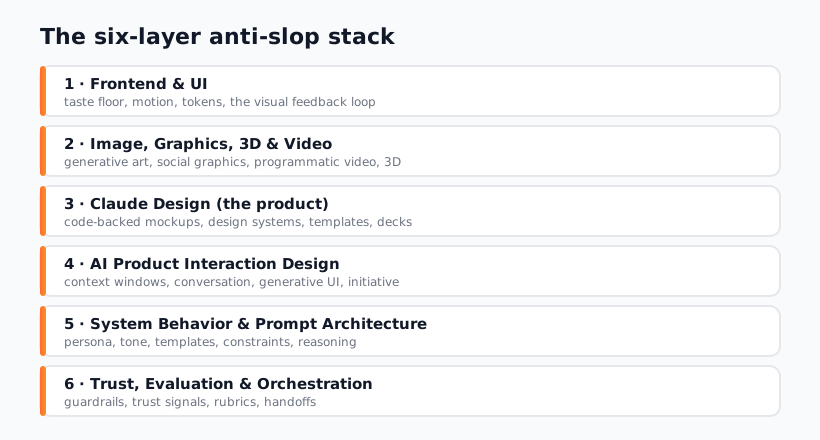
Layer 1 — Frontend & UI
This is the visible surface: layout, type, color, spacing, motion. It's where the slop signature shows up most loudly — the gradient, Inter, four cards, one weak hover. Overwriting this layer is the highest-leverage single move because it's what every visitor sees first. Anthropic's frontend-design skill sets the floor here; if you want a stronger opinion, impeccable and the minimalist or brutalist skills push in specific directions.
Layer 2 — Image, Graphics, 3D & Video
A premium layout with a generic stock-AI image still reads as slop. This layer governs everything visual that isn't UI chrome: hero imagery, social graphics, illustration, motion design, and video. The median here is the over-smooth, over-lit "AI image" look. Skills like nano-banana and canvas design handle graphics, while remotion-superpowers and aftereffects-motion cover programmatic video and motion graphics.
Layer 3 — Claude Design (Product)
Above individual screens sits product-level design: mockups, flows, and the coherence between screens. This is where a build stops looking like a pile of components and starts looking like a product somebody designed on purpose. The claude-design web app mockups and redesign skills operate at this altitude — composing screens into something coherent rather than perfecting one card.
Layer 4 — AI Product Interaction Design
When your product is AI — a chat surface, an agent, a generative feature — the interaction itself is a design problem most builders skip. How does the model ask for input? How does it show its work? How does it fail gracefully? The median is a bare text box and a spinner. The model interaction design skill overwrites that default with patterns for designing the human-AI interaction, not just the chrome around it.
Layer 5 — System Behavior & Prompt Architecture
One layer deeper, the agent itself needs designing. How you structure prompts, shape system behavior, and architect the agent's instructions determines whether the output is reliable or random. This is design applied to the model's behavior. Prompt architecture and system behavior shaping live here — they're why your good results repeat instead of being lucky one-offs.
Layer 6 — Trust, Evaluation & Orchestration
The top of the stack is knowing it's actually good and keeping it good at scale. Evaluation tells you whether the output meets the bar; orchestration coordinates multiple agents without the quality drifting. Without this layer, you're shipping on vibes. The evaluation skill and design agent orchestration skill close the loop, with ai-alignment-reasoning reinforcing the trust dimension.
The Stack at a Glance
Here's the whole map in one table — layer, the slop it kills, and an example skill to start with.
| Layer | What it fixes | Example skill |
|---|---|---|
| 1. Frontend & UI | Generic layout, type, color, weak motion | frontend-design |
| 2. Image, Graphics, 3D, Video | Over-smooth "AI image" look, flat motion | nano-banana |
| 3. Claude Design (Product) | Incoherent screens, no product-level intent | claude-design mockups |
| 4. AI Product Interaction | Bare text box, spinner, no failure design | model interaction design |
| 5. System Behavior & Prompts | Random results, unreliable output | prompt architecture |
| 6. Trust, Eval & Orchestration | Shipping on vibes, quality drift at scale | evaluation |
You do not install all six at once. You find the layer where your slop actually lives — for most builders that's layer 1 — and overwrite it first. Then move up the stack only when the layer below it is solid. The next article narrows this all the way down: don't install 45 skills, stack these four gives the minimal recipe that covers the layers that matter most.
If you're building a token system to back layer 1, the sibling AI Design Systems series covers DESIGN.md files in depth. Otherwise, browse the Designs category and match a skill to your layer.
Frequently Asked Questions
Do I need a skill for every layer?
No — that's the fastest way to over-engineer. Most builders have slop on layer 1 and maybe layer 2, and fixing those two carries 80% of the visible quality. Add higher layers only when your product genuinely lives there: layer 4 if you're shipping an AI interaction surface, layer 6 if you're running multiple agents at scale. Match the skill to your actual problem.
Which layer should I fix first?
Layer 1, almost always. It's what every visitor sees in the first second, and the slop signature is loudest there. A skill like frontend-design overwrites the visible median and buys you the most credibility for the least effort. Work up the stack only after the surface looks committed.
Are layers 5 and 6 really "design"?
Yes, in the sense that matters: they're deliberate decisions that shape the output's quality. Prompt architecture designs how the model behaves; evaluation designs how you know it's good. They don't draw pixels, but they're why the pixels in layers 1–3 come out reliably instead of by luck. Skipping them means your good output isn't repeatable.
How does this relate to the four-skill starter recipe?
The four-skill recipe is a deliberate subset of this stack — a base taste skill (layer 1), motion, tokens, and a visual feedback loop. It deliberately skips layers 4–6 because most builders don't need them yet. Think of this six-layer map as the full territory and the four-skill stack as the trail most people should actually walk first.
Where do design tokens fit in this stack?
Tokens sit underneath layer 1 as the substrate that makes consistent UI possible — a palette, type scale, and spacing rhythm the agent reads on every screen. A skill like theme-factory generates them, and the AI Design Systems series covers the DESIGN.md token-file approach in full. Tokens are what keep layer 1 coherent across thirty screens instead of three.
Browse the curated design skills in the Designs category, or explore the full catalog at aiskill.market.