AI Design All Looks the Same. Here's the Tell.
Every vibe-coded site has the same signature: purple gradient, Inter, four cards, one weak hover. Here's why models ship it and how to overwrite it.
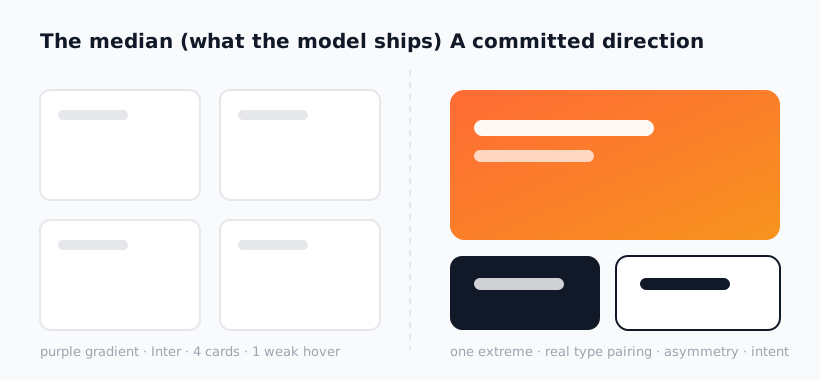
You've seen it a hundred times this month. A purple-to-white gradient bleeding across the hero. Inter at three weights. Four feature cards in a tidy grid. One sad hover state that nudges a shadow and calls it interaction. Every vibe-coded site looks like every other vibe-coded site, and once you see the pattern you cannot unsee it. That sameness is a tell — it broadcasts "an AI generated this and nobody pushed back."
This is the opening piece of a 20-part series on killing AI design slop. The core thesis is one sentence: the model ships the median, and the median is dead. The fix is not better prompting and it is not banning fonts. The fix is a design skill — a plain-markdown rules file that loads into your agent and overwrites its default taste before a single line of CSS gets written. This post explains the tell, why it exists, and the lever that beats it.
Key Takeaways
- The slop signature is real and specific. Purple/indigo gradient, Inter font, four-card grid, one weak hover — if your AI build has all four, it reads as generic on sight.
- Models ship the median by design. They're trained to predict the most probable token, and the most probable design is the average of everything they saw. Average is forgettable.
- A prompt fades; a skill persists. One-off instructions get diluted across a long build. A
SKILL.mdfile reloads its rules on every relevant turn. - Skills overwrite default taste before CSS. The frontend-design skill rewrites the agent's aesthetic priors so the first draft already looks committed, not median.
- Taste is still yours. Skills get you to senior-looking output. Knowing which constraints fit the product is still your judgment, not a blocklist.
The Slop Signature
Pull up the last ten "I built this with AI in an afternoon" sites and you can predict the design before the page loads. There is a remarkable convergence, and it has a fingerprint. Here is the checklist that gives it away.
| Slop tell | What the median ships | What committed design does |
|---|---|---|
| Background | Purple/indigo-to-white gradient | A real palette with an opinion |
| Type | Inter, 2–3 weights, default scale | A type pairing with contrast and rhythm |
| Layout | Four cards, even grid, centered | Asymmetry, hierarchy, intentional density |
| Motion | One hover that bumps a shadow | Choreographed, eased, purposeful motion |
| Spacing | Uniform, timid, no rhythm | A spacing scale that creates emphasis |
None of these choices is wrong. That's exactly the problem. Each is the safe, defensible, most-common option — and stacked together they produce a page with no point of view. The tell isn't ugliness. It's the absence of a decision.
Why Models Ship the Median
A language model generates the most probable next token given everything before it. That is the whole engine, and it is also why the design is generic. When you ask for "a clean landing page," the most probable design — the one sitting at the center of the model's training distribution — is the gradient-Inter-four-card layout, because that pattern appears in a million tutorials, templates, and starter kits. The model isn't failing. It's succeeding at being average.
This is why "make it look better" prompts disappoint. You're asking the model to wander away from its own center of gravity with no map for where to go. It drifts back to the mean because the mean is where the probability mass lives. To get committed design, you have to move the center itself — change what the model treats as the default. That is a different operation than asking nicely, and it's exactly what a design skill does.
How a Skill Overwrites Default Taste
A design skill is a SKILL.md file — plain markdown describing the rules, constraints, and aesthetic priors the agent should follow. When it's installed, your coding agent loads it as context before it writes code. Instead of reaching for the median, the agent now reaches for your skill's opinion: a real type scale, deliberate spacing, motion principles, a palette with intent. The default taste gets overwritten before the first line of CSS exists.
The cleanest place to start is Anthropic's own frontend-design skill. It encodes a senior frontend sensibility — hierarchy, restraint, motion discipline — directly into the agent's working context. Install it once:
npx skills add anthropics/skills --skill frontend-design
From there, your "build a landing page" prompts stop producing the slop signature, because the agent is no longer drawing from the median. It's drawing from a curated point of view that ships on every relevant turn. The next post, what a design skill actually is, goes deep on why this beats retyping a prompt and how SKILL.md differs from a system message.
One thing skills do not do: replace your judgment. They raise the floor to senior-looking. Choosing whether a brutalist, minimalist, or editorial direction fits this product is still on you — the skill removes the generic default so your taste has room to operate. If you want the deeper philosophy here, the taste skill is built around exactly that idea.
The Six-Layer Stack Ahead
Beating slop on the homepage is layer one. Real products have more surface area — images and graphics, product interaction patterns, system behavior, trust and evaluation. Each layer has its own median, and each has skills that overwrite it. The rest of this series maps the whole landscape in the six-layer anti-slop stack, then narrows to a tight starter recipe in don't install 45 skills, stack these four.
The takeaway for now: the sameness you keep seeing isn't a mystery and it isn't permanent. It's the predictable output of an averaging machine, and a single markdown file changes what that machine averages toward. Browse the curated options in the Designs category and pick a point of view before you write code, not after.
Frequently Asked Questions
Why do all AI-generated sites look the same?
Because a model generates the most probable design, and the most probable design is the average of its training data — the gradient-Inter-four-card pattern that fills tutorials and templates. Without an instruction that moves the model away from its center, it returns to the mean every time. The sameness is a feature of how the model works, not a bug you can prompt away with "make it nicer."
Isn't this just a list of banned fonts and colors?
No, and that's the key distinction. A blocklist tells the model what to avoid but gives it nowhere better to go, so it lands on a different median. A design skill supplies a positive point of view — a real type scale, spacing rhythm, and motion discipline — so the agent has a committed direction to draw from. Taste comes from understanding constraints, not from a list of forbidden choices.
Does installing frontend-design make me a designer?
It makes your output look like a senior frontend developer made it, which closes most of the gap. It does not replace the judgment of choosing which direction fits your product. Think of it as raising the floor: the generic default disappears, and your decisions about tone and constraints now actually show through.
Will this work in Cursor and Codex too, or only Claude Code?
Design skills are plain SKILL.md files, and the npx skills add installer targets the universal skills format that loads into Claude Code, Cursor, and Codex. The mechanism is the same everywhere: the file becomes context the agent reads before writing code. The next article covers the three install methods in detail.
Browse the curated design skills in the Designs category, or explore the full catalog at aiskill.market.