What a Design Skill Actually Is (and Why It Beats a Prompt)
A design skill is a plain-markdown SKILL.md the agent loads on every turn. Here's why that beats a one-off prompt, plus the three ways to install one.
You can fight AI design slop with a prompt. You'll lose. Not because the prompt is wrong, but because it's temporary. You type "make it look premium, use real hierarchy, avoid the generic gradient," the agent obeys for one screen, and twelve turns later it's back to four cards and a weak hover. The instruction got diluted, then forgotten. A design skill doesn't get forgotten — and that single difference is the whole game.
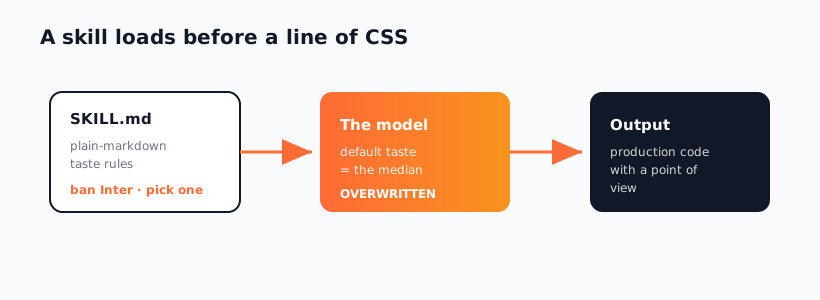
This is part of the "Killing AI Design Slop" series. The previous post explained why models ship the median and that a skill overwrites the model's default taste. This one zooms into the mechanism: what a SKILL.md file actually is, why it beats a prompt, and the three ways to install one into your agent.
Key Takeaways
- A skill is a plain-markdown rules file.
SKILL.mddescribes the constraints, taste, and patterns the agent should follow — no code, no config language, just markdown. - The agent reloads it every relevant turn. Unlike a prompt you type once, a skill persists across the whole build, so screen 30 looks like screen 1.
- A prompt is a wish; a skill is a constraint. Wishes get diluted by the next twenty messages. Constraints stay loaded.
- Three install paths, one format. Universal
npx skills add, the Claude Code plugin marketplace, or MCP — pick by your tooling. - Stack a base taste skill plus an opinion. frontend-design sets the floor; taste-skill sharpens the judgment layer.
What a SKILL.md File Actually Contains
Open any design skill and you'll find markdown, not magic. A SKILL.md has a short frontmatter block (name, description, when to use it) and then a body of rules written in plain English: how to handle type scales, when to use motion, what spacing rhythm to follow, which aesthetic defaults to reject. That's it. There's no DSL to learn and no build step. If you can write a README, you can read — and edit — a skill.
The power isn't in the syntax. It's in when the file loads. Your agent reads the skill into context before it generates code, so the rules are present at the exact moment design decisions get made. The model isn't being asked to remember your one-off instruction from earlier; the constraints are right there in front of it, every relevant turn. That's the difference between hoping the model behaves and structuring the context so it has to.
Why a Skill Beats a Prompt
A prompt and a skill can contain identical words. The difference is persistence and reload. Here's the contrast laid out.
| Dimension | One-off prompt | Design skill (SKILL.md) |
|---|---|---|
| Lifespan | This turn, then it decays | Every relevant turn, whole build |
| Dilution | Buried under later messages | Re-loaded fresh each time |
| Portability | Lives in your head, retyped | A file you commit and share |
| Consistency | Drifts as the session grows | Screen 30 matches screen 1 |
| Versioning | None | Git-tracked, reviewable, updatable |
The killer column is consistency. On a real build you'll generate dozens of components across a long session, and a prompt's influence fades as the context window fills with code, errors, and follow-ups. A skill stays anchored because the agent reloads it whenever design work comes up. You stop re-explaining your taste and start shipping it. This is also why skills version cleanly — when you improve a rule, every future build inherits it, which a retyped prompt can never do.
The Three Ways to Install a Skill
There are three install paths, and they all deliver the same SKILL.md to your agent. Pick by your tooling.
1. Universal installer (npx skills add) — the simplest, works across Claude Code, Cursor, and Codex. Point it at a repo and name the skill:
npx skills add anthropics/skills --skill frontend-design
This drops the skill into your project's skills directory where the agent picks it up automatically. It's the path most of this series uses because it's the most portable.
2. Claude Code plugin marketplace — if you live in Claude Code and want a curated collection, add a marketplace and install from it:
/plugin marketplace add anthropics/skills
/plugin install frontend-design
This is handy when you want skills managed as plugins with updates, rather than copied files.
3. MCP server — for skills that ship as Model Context Protocol servers (often when the skill needs live tools, not just rules), wire it in with the Claude CLI:
claude mcp add <server-name> -- <command to start the server>
MCP is the right path when a skill does more than supply context — for example, a design skill that also reads your running app or hits a rendering tool. For pure taste rules, the universal installer is lighter.
Two Skills to Start With
You don't need a pile of skills to feel the difference — you need a base and an opinion. The base is Anthropic's frontend-design, which encodes a senior frontend sensibility and sets the floor for hierarchy, restraint, and motion:
npx skills add anthropics/skills --skill frontend-design
The opinion layer is the taste-skill, built around the idea that taste is understanding constraints — not memorizing banned fonts. It sharpens the judgment the base skill leaves to you:
npx skills add https://github.com/Leonxlnx/taste-skill --skill taste-skill
Run both and your agent stops shipping the median. But resist the urge to install twenty — the next article, don't install 45 skills, stack these four, explains why a tight stack beats a sprawling one. If you're building a token system on top of this, the sibling AI Design Systems series covers DESIGN.md token files in depth. Either way, start by browsing the Designs category and picking your base.
Frequently Asked Questions
Is a design skill just a saved prompt?
No — and the difference is mechanical, not semantic. A saved prompt still has to be pasted in and still decays as the session grows. A skill is a file the agent reloads on every relevant turn, so its rules are present at the moment design decisions are made, not buried twenty messages back. Same words, completely different persistence.
Do I need to know how to code to write or edit one?
No. A SKILL.md is plain markdown — frontmatter plus rules in English. If you can edit a README you can adjust a skill: tighten a spacing rule, change a motion default, add a constraint. That accessibility is the point; design taste shouldn't require a build step.
Which install method should I use?
Use the universal npx skills add path unless you have a reason not to — it works across Claude Code, Cursor, and Codex and just drops a file the agent reads. Choose the plugin marketplace if you want managed updates inside Claude Code, and MCP only when the skill needs live tools rather than pure rules. All three end up delivering the same SKILL.md context.
Can I run multiple design skills at once?
Yes, and a base-plus-opinion pairing like frontend-design and taste-skill works well together. But more is not better — overlapping skills can contradict each other and dilute the very consistency you installed them for. Keep the stack tight; four well-chosen skills beat fifteen noisy ones.
Will the skill override my project's own CLAUDE.md rules?
Skills and your CLAUDE.md are complementary, not competing. The skill supplies reusable design taste; your CLAUDE.md supplies project-specific rules like brand colors or component conventions. When they overlap, your project file is the more specific instruction and should win — keep brand specifics in CLAUDE.md and reusable taste in the skill.
Browse the curated design skills in the Designs category, or explore the full catalog at aiskill.market.