Motion That Doesn't Feel Cheap: The Emil Rules
The hard motion rules that separate senior animation from slop: durations, easing, exits faster than entrances, transform-only for 60fps, and reduced-motion respect.
Motion is where AI design slop gets loud. The default agent animation is a 1-second fade on everything, the same linear ease, entrances and exits at identical speed, the whole page lurching as it animates layout properties that can't hit 60fps. It feels cheap, and "cheap" is precise here — it's the specific feeling of motion that was added without rules. The model knows animations exist; it doesn't know how they're supposed to behave.
Good motion is almost entirely a matter of numbers and discipline. Durations in tight ranges. Easing that matches direction. Exits faster than entrances. Only animating the two properties the GPU can handle for free. Respecting the user who asked the OS to calm things down. None of this is taste — it's a rulebook, and the rulebook is the difference between motion that feels engineered and motion that feels like a model guessed. This is the Emil rulebook, named for the motion principles that codify it.
Key Takeaways
- Cheap motion is a rules problem, not a taste problem. The defaults — slow, linear, symmetric, layout-animating — are wrong in measurable ways. Fix the numbers, fix the feel.
- Duration ranges are tight and specific. Micro-interactions 150–250ms, transitions 200–350ms, never over 1s. Outside those ranges, motion reads as cheap or sluggish.
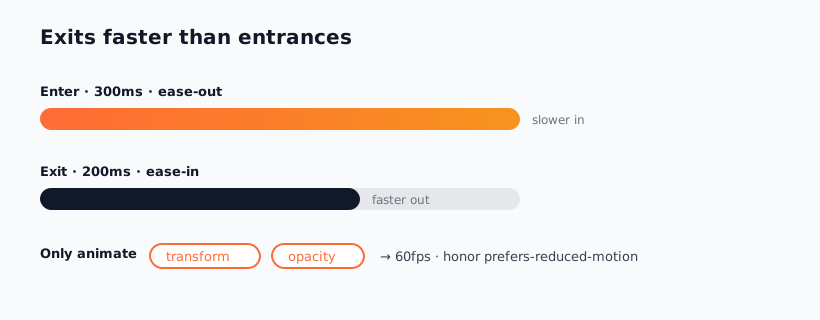
- Exits are faster than entrances. Roughly 300ms in, 200ms out. Symmetric timing is a dead giveaway of unconsidered motion.
- Only animate transform and opacity. They're the only properties that hit 60fps reliably. Animating width, height, or top janks — and jank is slop you can feel.
- Honor prefers-reduced-motion, always. It's an accessibility requirement and a quality signal. animate bakes every one of these rules into the agent.
Why Default Motion Feels Cheap
When an agent adds animation with no guidance, it reaches for the most generic possible motion: a fade, around a second long, with a linear or default ease, applied identically to things appearing and disappearing. Every one of those choices is subtly wrong. A second is too slow — the user is waiting on the animation instead of being guided by it. Linear easing has no physical feel; nothing in the real world moves at constant velocity. Symmetric in-and-out timing ignores that arrivals and departures should feel different.
And then there's jank. The model frequently animates layout properties — width, height, top, left, margin — which force the browser to recompute layout every frame. The result drops below 60fps and stutters. Users can't always name it, but they feel it: the motion is rough where it should be liquid. Cheap motion is often just janky motion, and janky motion is almost always animating the wrong properties.
The deeper issue is that motion has correct answers the model doesn't know. There's a right duration band, a right easing for direction, a right relationship between entrance and exit. Get them right and the motion disappears into the experience. Get them wrong and it announces itself as generated.
The Motion Rulebook
Here's the discipline, as a table. These ranges aren't suggestions — they're the bands where motion feels engineered rather than cheap. Memorize them, or load a skill that knows them.
| Motion type | Duration | Easing |
|---|---|---|
| Micro-interaction (hover, tap, toggle) | 150–250ms | ease-out |
| Transition / reveal (panel, modal in) | 200–350ms | ease-out |
| Entrance | ~300ms | ease-out |
| Exit | ~200ms (faster than entrance) | ease-in / ease-out |
| Stagger between list items | 30–60ms per item | ease-out |
| Hard ceiling — anything | never over 1000ms | — |
A few rules don't fit neatly in the table but matter just as much:
- Ease-out for entrances. Things arriving should decelerate into place — fast at first, settling at the end. Ease-out feels like an object coming to rest. Ease-in for entrances feels broken because it accelerates away at the moment it should settle.
- Exits faster than entrances. Roughly 300ms in, 200ms out. An arriving element earns the user's attention; a departing one should get out of the way quickly. Symmetric timing is the single most common tell of unconsidered motion.
- Only animate
transformandopacity. These are the two properties the GPU composites without touching layout, so they hit 60fps. Animate position withtranslate, nottop. Animate size withscale, notwidth. This one rule eliminates most jank. - Stagger, don't dump. When a list appears, offset each item 30–60ms. The eye reads sequence as intentional; everything appearing at once reads as a flash.
Respecting prefers-reduced-motion
There's one rule that is non-negotiable: honor prefers-reduced-motion. Some users get motion sickness, vestibular disorders, or simply distraction from animation, and they've told their operating system so. Ignoring that preference isn't just rude — it's an accessibility failure, and it's a reliable tell that motion was bolted on without care.
Respecting it is mechanical. Wrap non-essential motion in a media query and provide a calm fallback:
@media (prefers-reduced-motion: reduce) {
  *, *::before, *::after {
    animation-duration: 0.01ms !important;
    transition-duration: 0.01ms !important;
  }
}
The discipline is: motion should enhance the experience for people who want it and vanish for people who don't. Essential motion (a loading spinner that communicates state) can stay; decorative motion (a parallax flourish) must go. A skill that knows the Emil rules treats this as a default, not an afterthought — which is exactly the point of loading one.
Loading the Rules into Your Agent
You can memorize all of this, or you can make the agent obey it automatically. The animate skill encodes the Emil rulebook — durations, easing, exit-faster-than-entrance, transform-only, reduced-motion — into a SKILL.md the agent reads before it writes a single keyframe. Install it from the source repo:
npx skills add https://github.com/delphi-ai/animate-skill --skill animate
With it loaded, "add a nice entrance animation" stops producing a 1-second linear fade and starts producing a 300ms ease-out transform that respects reduced motion — because the agent now has the rules instead of guessing. Prompt for motion the same way you'd brief a senior engineer:
"Add motion to the modal. Entrance ~300ms ease-out, exit ~200ms,
animate transform and opacity only, and honor prefers-reduced-motion.
No layout-property animation, nothing over 1s."
For the why behind the numbers — the principles that make these ranges correct rather than arbitrary — pair it with design motion principles, which goes deeper on the reasoning so you can extend the rules to cases the table doesn't cover. The rulebook gets you to senior motion by default; the principles let you make new calls when the situation is novel.
Frequently Asked Questions
Why is a 1-second animation too long?
Because at that length the animation stops guiding the user and starts blocking them — they're waiting for the motion to finish before they can act. The job of UI motion is to make a transition legible, not to perform. Keep micro-interactions in the 150–250ms band and transitions under 350ms, with a hard ceiling of 1s for anything. Past that, it reads as sluggish and cheap.
Why should exits be faster than entrances?
An element arriving earns the user's attention, so it can take ~300ms to settle gracefully. An element leaving has already done its job, so it should clear out fast — ~200ms — to avoid making the user wait on something they're done with. Symmetric in/out timing is one of the clearest tells that motion was added without thought. Asymmetry is the senior default.
What's wrong with animating width or height?
They force the browser to recompute layout every frame, which drops you below 60fps and produces visible jank. Only transform and opacity are composited on the GPU without touching layout, so they animate smoothly. Use scale instead of width, translate instead of top. This single substitution eliminates most of the roughness that makes agent motion feel cheap.
Is honoring prefers-reduced-motion really necessary?
Yes — on two counts. It's an accessibility requirement (some users get genuinely sick from motion), and it's a quality signal that separates considered work from bolted-on animation. Wrap decorative motion in a prefers-reduced-motion media query with a calm fallback. The animate skill handles this by default, so loading it removes the chance of forgetting.
How does motion fit with the rest of the anti-slop stack?
Motion is the last layer — it animates a design that should already be committed and correct. Get the aesthetic direction and type right first, verify the static render with the visual feedback loop, then add motion under the Emil rules. Motion on top of slop is just animated slop; motion on top of committed design is what makes it feel alive.
Kill cheap motion with the rulebook — browse motion skills in the Designs category, or explore the full skill catalog at aiskill.market.