Give Your Agent Eyes: The Visual Feedback Loop
The single highest-leverage move in AI design: let the agent screenshot the rendered page, compare to a reference, and iterate. Without eyes you trust a blind model.
Here's a quiet truth about every UI a coding agent builds: it never sees it. The agent writes CSS, the CSS produces a rendered page, and the agent has no idea what that page actually looks like. It's painting with its eyes closed and trusting that the brushstrokes landed. Most of the time they don't — the layout breaks at 375px, the contrast fails, the spacing the agent "intended" came out wrong — and the agent has no way to know, because it can't look.
This is the single highest-leverage move in killing AI design slop, and almost nobody does it: give your agent eyes. Let it screenshot the rendered page, compare that screenshot to a reference design across viewports, and iterate on what it actually sees instead of what it blindly hopes it wrote. The model goes from trusting itself to grading itself. One change, and the quality ceiling jumps — because now there's a real signal instead of a guess.
Key Takeaways
- The agent is blind by default. It writes CSS and never sees the result. Every UI it ships is a guess about whether the code matched the intent.
- Eyes turn guessing into grading. Screenshot the rendered page, compare to a reference, and the agent gets a real signal it can act on — across every viewport.
- This is the highest-leverage single move. More than any font or color skill, the visual loop is what closes the gap between "looks fine to the model" and "looks right to a human."
- Two pieces make it work. webapp-testing drives the loop; the Playwright MCP gives the agent the browser to actually render and capture.
- The loop is the discipline, the reference is the bar. Eyes let the agent fix what it sees. A good reference tells it what "right" even means — that part is still yours.
Why a Blind Model Ships Broken UI
When an agent writes a flexbox layout, it's predicting that the code will produce the arrangement it has in mind. But CSS is full of gaps between intent and result — a min-width that forces an overflow, a gap that collapses, a font that renders heavier than expected, an image that pushes everything down. The agent's mental model of the page and the browser's actual render are two different things, and without eyes, the agent never learns they diverged.
This is why so much agent UI is "fine in theory, broken in practice." The desktop view looks plausible because that's what the agent optimized its guess for. Then you open it on a phone and the hero text is clipped, the cards stack wrong, and a button has slid off-screen. The agent didn't miss these — it never had the chance to see them. It was grading its own homework with the answer sheet face down.
A blind model also can't tell good from generic. It can't see that its output looks like every other agent-built page, because it can't see its output at all. Eyes are what let it notice "this looks like slop" and do something about it.
The Loop, Concretely
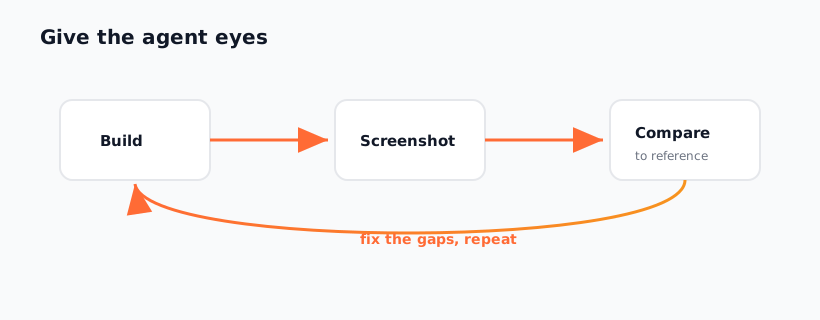
The visual feedback loop is a tight cycle: render → capture → compare → iterate. The agent runs the dev server, opens the page in a real browser, takes a screenshot at each viewport you care about, compares those screenshots against a reference (a design mock, a competitor, or a written spec), identifies the gaps, edits the CSS, and goes around again. It stops when the render matches the bar.
Here's the shape of it in practice:
| Step | What happens | What the agent learns |
|---|---|---|
| Render | Agent starts the dev server and loads the page | The page is actually reachable and builds |
| Capture | Screenshot at 375px, 768px, 1440px | How the layout truly behaves per viewport |
| Compare | Diff screenshot against reference / spec | The specific gaps between intent and result |
| Iterate | Edit CSS, re-render, re-capture | Whether the fix worked — measured, not assumed |
The magic is in compare. A reference turns a vague "make it look good" into a concrete, checkable target: "the headline should be this size, the spacing this generous, the layout this arrangement at mobile." The agent can now answer "did I hit it?" with a screenshot instead of a shrug. That single shift — from hope to evidence — is the whole unlock.
The Two Pieces You Need
You need a skill to drive the loop and a browser tool to run it.
The skill is webapp-testing — Anthropic's testing skill that teaches the agent the screenshot-compare-iterate discipline. Install it from the Anthropic repo:
npx skills add anthropics/skills --skill webapp-testing
The browser is the Playwright MCP, which gives the agent a real, scriptable Chromium it can navigate, resize, and screenshot. Add it once at the user level so it's available everywhere:
claude mcp add playwright -s user -- npx @playwright/mcp@latest
With both in place, the agent can open your running app, capture it at multiple widths, and feed those images back into its own reasoning. The skill knows what to do; the MCP gives it the ability to do it. Neither alone is enough — a skill with no browser is still blind, and a browser with no discipline is just a tool the agent forgets to use.
A Concrete Loop Prompt
Once the skill and MCP are wired, the loop is one prompt away. Be explicit about the reference and the viewports, and tell the agent to keep going until the render matches:
"Build the pricing page, then use the visual loop to verify it.
Run the dev server and screenshot the page at 375px, 768px, and
1440px. Compare each screenshot against the reference in
/design/pricing-ref.png. List every gap you see — spacing,
hierarchy, alignment, contrast, mobile breakage. Fix them, re-render,
re-screenshot, and repeat until the render matches the reference at
all three widths. Show me the before/after screenshots for each pass."
Two details make this work. First, the multiple viewports — most slop hides at mobile widths the agent never checks, so forcing 375px first surfaces breakage early. Second, "show me the before/after" — it makes the loop's progress visible to you and keeps the agent honest about whether each pass actually improved things.
If you don't have a reference image, give it a written spec or point it at a committed design direction — the loop works against any clear bar, not just a pixel-perfect mock. The reference is whatever defines "right" for this page.
Frequently Asked Questions
Why is the visual loop higher-leverage than design skills?
Because it operates on every decision instead of one. A font skill fixes fonts; a color skill fixes color; the visual loop catches anything that's wrong in the actual render — broken layouts, failed contrast, mobile breakage, generic-looking output. It's the difference between fixing known problems and detecting unknown ones. Stack it with the design skills and you get committed defaults plus a check that they survived contact with the browser.
Do I need a pixel-perfect reference design?
No. The loop works against any clear bar — a design mock, a competitor screenshot, or even a written spec ("generous spacing, one strong CTA, editorial type, no mobile clipping"). A precise reference gives precise results, but a written target still beats no target. The point is giving the agent something concrete to compare against so "did I hit it?" has an answer.
Won't all this screenshotting be slow?
It's slower per pass and far faster overall. The alternative is you manually opening the app, spotting the mobile breakage, describing it back to the agent, and waiting for a fix — a slow human-in-the-loop cycle. The visual loop moves that grading into the agent itself, so it catches and fixes most issues before you ever look. You trade a few automated passes for not being the QA department.
Can it really judge whether something looks "good," not just "correct"?
Within limits, yes — and far better than blind. With eyes, the agent can see that its output looks generic, that the hierarchy is flat, that the spacing wanders, and correct toward the reference. It won't develop taste from nothing, but compared to a model that can't see its own work at all, the jump is enormous. The reference supplies the taste; the loop lets the agent chase it.
How does this fit with the rest of the anti-slop stack?
It's the verification layer. Banning Inter and committing to one extreme set good defaults before generation; the visual loop checks that those defaults rendered correctly after. Together with the portable systems in the Designs category and the AI Design Systems series, you get good intent in and verified results out.
Give your agent eyes, then point it at a real bar — start in the Designs category, or explore the full skill catalog at aiskill.market.